The backstage checklist
Your role
Section titled “Your role”Staff run the backstage line. As each category comes up, you gather its athletes, check them against the list, and mark them ready so the Commissar knows the group can go on. One screen, built for a phone carried in the wings.
Signing in
Section titled “Signing in”- Open your organization’s instance in the browser, for example
icn-system.eu. - Sign in with your staff account. Credentials come from your administrator.
You land on the competition list. Only competitions that are in progress appear, and the list refreshes itself.

Tap Open to enter the queue.
The check-in queue
Section titled “The check-in queue”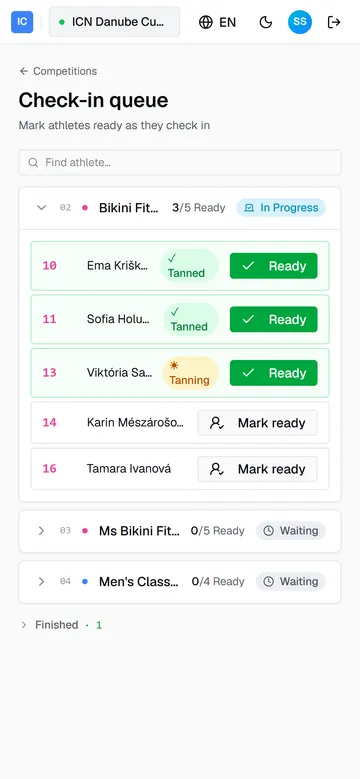
The queue is the running order, category by category. The active category sits open at the top; the rest are collapsed, with Finished categories tucked away at the bottom. Find athlete jumps to anyone by name or number.
Each athlete is one row: starting number, name, and a Mark ready button. Tap it when the athlete is lined up and it turns into a green Ready. The category header counts them off, “3/5 Ready”, so you can see at a glance whether the group is complete.
A tanning chip sits next to any athlete still tanning or already tanned (Tanning, Tanned), a read-only signal from the tanning desk so you know who is not back yet.
If something goes wrong
Section titled “If something goes wrong”- An athlete is not in the category. The queue follows what registration entered. A missing or misplaced athlete is fixed at the registration desk, not here.
- Someone tanned but has no chip. The chip follows the tanning desk. If it is behind, the athlete can still be marked ready; the chip is a heads-up, not a gate.
- The queue is empty. The competition is not in progress yet. The list fills on its own once the stage starts.
Guide version 1.0.18(sha-adb4952)