Getting started
Before the competition
Section titled “Before the competition”The organizer creates your judge account and gives you its e-mail address and password. The app runs in your phone’s browser; there is nothing to install. Any reasonably modern phone, tablet, or laptop works. This guide shows phone screens because that is how most judges vote.
Signing in
Section titled “Signing in”- Open your organization’s instance in the browser, for example
icn-system.eu. - Sign in with your judge account.
Your password is not permanent. It is reissued when the organizer opens a competition and again when they close it, so the one that worked at the last show will not work at this one. Ask for the current password when you arrive. If it stops working during the day, the organizer can set you a new one in a few seconds. You are not locked out of the round.
You only see what concerns you: competitions you are assigned to, while they are live.
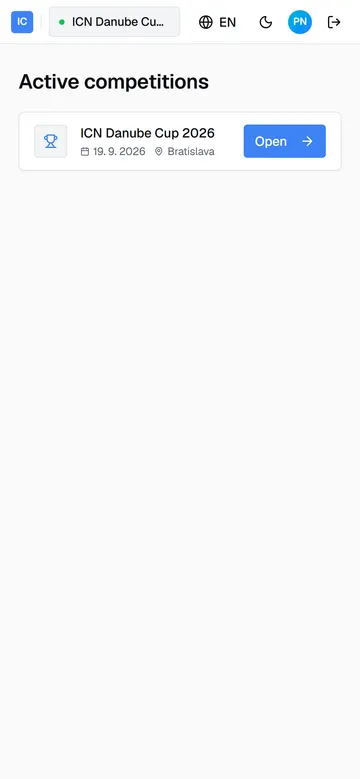
Tap the competition to enter its dashboard.
The judge dashboard
Section titled “The judge dashboard”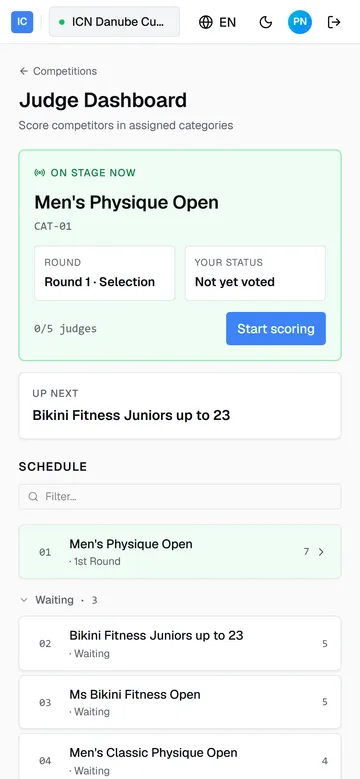
The dashboard is your home for the whole show. It refreshes itself; no need to reload.
- On stage now, the green card, is the category currently being judged: its name, the current round (Round 1 · Selection or Round 2 · Ranking), your own voting status, and how many judges have voted. Start scoring opens the voting screen. It is disabled once you have voted in the current round.
- Up next shows the following category.
- Schedule lists every category in running order, grouped by state: the active one on top, then Waiting, then finished. Finished categories link to their results. The number on the right is the category’s competitor count.
You never hunt for a category. When the Commissar starts the next one, it appears as On stage now and voting opens. After you vote, the app returns you here to wait for the rest of the panel.
Guide version 1.0.18(sha-adb4952)