Announcing results
Your role
Section titled “Your role”The Moderator reads the show. The live screen mirrors the judging as it happens: which category is on stage, how far each round has progressed, which starting numbers made the final, and the placements the moment they exist. There is nothing to press; the screen is there to announce from.
Signing in
Section titled “Signing in”- Open your organization’s instance in the browser, for example
icn-system.eu. - Sign in with your moderator account. Credentials come from your administrator.
The password changes with each show. It is reissued when the administrator opens a competition and again when they close it, so ask for the current one before you go on. If it stops working mid-show, they can reset your account in a few seconds.
You land on the competition list; only competitions in progress appear.

Tap Open to enter the live screen.
The live screen
Section titled “The live screen”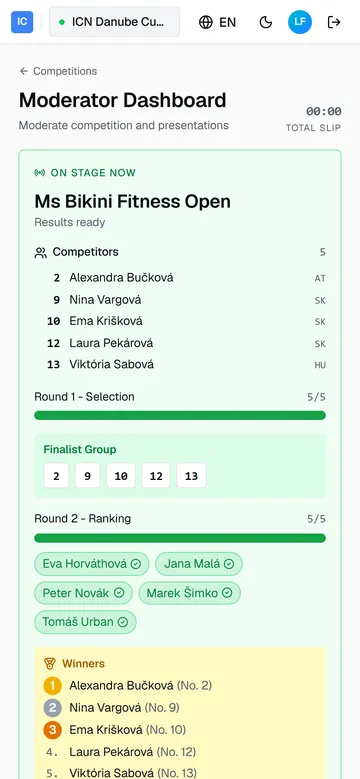
- On stage now carries the running category, and under it Competitors: everyone in that category with their starting number, name, and country. The full list is there from the moment the category goes on stage, before any judge has voted, so you can introduce the line-up as they walk on.
- A progress bar per round follows: Round 1 - Selection and Round 2 - Ranking, each counting submitted votes against the panel. Under the round that is running, every judge has a chip: green with a check once they have submitted, grey while you are still waiting on them. The Commissar sees the same chips, so you both know who is holding the round up.
- If the second round sits unfinished for about five minutes, a warning joins it naming the judges who have not submitted, so you know whether to stretch or to expect the Commissar to step in.
- Finalist Group appears when round 1 closes: the starting numbers that advance. Match them against the competitor list above to put names to the numbers.
- Winners appears when round 2 closes: placements from first place down, with names and starting numbers. If the category was closed without the whole panel, the list says so, for example scored by 4 of 5 judges. The placements are final either way; announce them as normal.
- The header keeps the clock. Total slip tracks how far the day runs ahead of or behind the printed schedule; while a category is mid-round, a Time left countdown joins it.
- Scroll down for the schedule: every category in running order with its status, and its competitor count on the right.
The screen polls on its own; nothing needs reloading.
Announcing a category
Section titled “Announcing a category”- As the category comes on, introduce the competitors from the Competitors list. Numbers, names, and countries are all there before voting starts.
- When round 1 closes, read the Finalist Group numbers to call the finalists back on stage. The judges’ phones move on to ranking by themselves.
- When the category status reads Results ready, the Winners list is final. Announce placements straight from it.
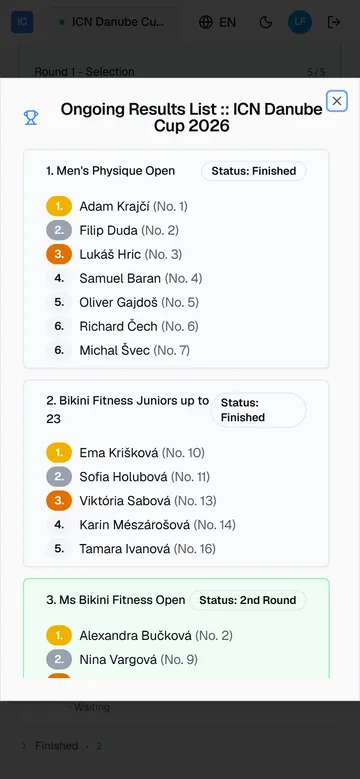
- To recap an earlier category, open Ongoing Results: the standings so far for every category, in running order.
After the last category
Section titled “After the last category”When every category is finished, the green card gives way to Voting complete: all categories are finished and the results are below. The administrator locks them as the official record when the competition is closed out.
If something goes wrong
Section titled “If something goes wrong”- Winners never fills in. Round 2 is still open: the grey chip under Round 2 - Ranking is the judge who has not submitted. After about five minutes a warning names them too, and the Commissar sees the same warning and can close the category without them.
- No category is on stage. The Commissar has not started the next one yet. The screen picks it up the moment they do.
- The competition is missing from the list. It has not been moved into progress yet. The list updates on its own once it has.
Guide version 1.0.18(sha-adb4952)