Running the stage
Your role
Section titled “Your role”The Commissar controls the running order on competition day. Judges cannot vote until you start a category, and the schedule does not move on until you finish one. Everything happens on one screen, built for a phone or tablet held backstage.
The rhythm for every category is the same: start it, watch the votes come in, finish it, call the next one.
Signing in
Section titled “Signing in”- Open your organization’s instance in the browser, for example
icn-system.eu. - Sign in with your commissar account. Credentials come from your administrator.
The password changes with each show. It is reissued when the administrator opens a competition and again when they close it, so ask for the current one at the start of the day. If it stops working while the stage is running, they can reset your account on the spot.
You land on the competition list. Only competitions that are in progress appear, and the list refreshes itself.

Tap Open to enter the live screen.
The live screen
Section titled “The live screen”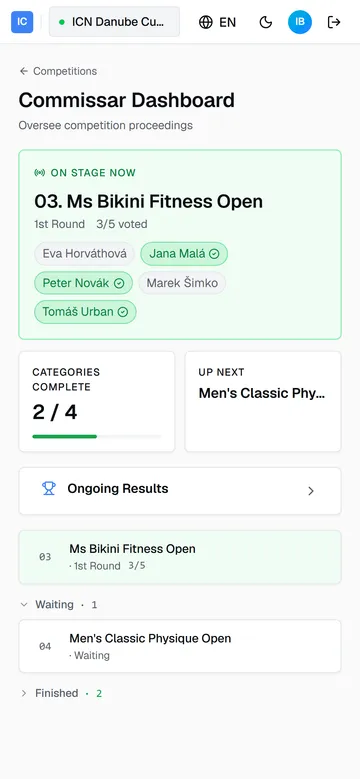
- On stage now, the green card, is the running category: its name, the current round, and the voted count. Every judge on the panel appears as a chip; a check mark lands on the chip the moment their vote does.
- Categories complete counts finished categories against the schedule (3 / 12), with a bar that fills as the day goes.
- Up next names the category that should follow.
- Ongoing Results opens the standings of every category finished so far.
- The schedule lists every category in running order: the active one on top, then Waiting, then Finished.
The screen polls on its own. Leave it open; there is nothing to reload.
Starting a category
Section titled “Starting a category”A green Start button sits on every waiting category, but only while nothing is on stage; one category runs at a time. Confirm the athletes are lined up, then tap Start. Two things happen at once: the category becomes On stage now, and voting opens on every judge’s phone.
While the judges vote
Section titled “While the judges vote”Watch the voted count on the green card. The first round, where each judge selects five finalists, closes by itself: the moment the last judge submits, the app advances the category to the second round and the judges’ phones switch to ranking. You do nothing between rounds.
The chips tell you who is holding things up. A judge without a check mark has not submitted in the current round.
Finishing a category
Section titled “Finishing a category”Once every judge has submitted the second round, the Finish button appears on the category. Tap it when the stage is clear. Placements are computed immediately, the category moves to Finished, its standings appear under Ongoing Results, and the next category’s Start button unlocks.
When a judge cannot submit
Section titled “When a judge cannot submit”You do not have to watch the chips to notice this. Once a category has been waiting on its second round for about five minutes, the card raises a warning naming the judges who have not submitted. Five taps on a tablet already in hand is a quick job, so a healthy category clears well inside that; a category still waiting after it usually means a phone has dropped rather than a judge deliberating.
If a judge’s tablet dies and they cannot get back in, Finish anyway appears in its place. It waits for the same five minutes as the warning, so it is never offered while a judge might simply be mid-vote, and it needs at least three judges to have ranked the round. It asks you to confirm and names the judges who are still missing. Placements are then computed from the rankings that did arrive, so use it only when the missing judge genuinely cannot submit. Getting them back on their phone is always the better outcome.
Below three rankings the category cannot be closed at all: the scoring drops the highest and lowest ranking of each competitor, so there would be nothing left to place them by.
A category closed this way is marked wherever its placements appear, including under Ongoing Results, as scored by fewer than the full panel. The placements are real; the label is there so nobody later reads them as a full-turnout result.
If something goes wrong
Section titled “If something goes wrong”- A chip never gets its check mark. The judge’s phone is the problem, not the vote: have them reopen the browser and sign in again. Their dashboard takes them straight back to the vote.
- Start is missing. Another category is still on stage. Finish it first.
- Finish never appears. Not every judge has submitted the second round. Check the chips, and get the missing judge back on their phone. If they cannot submit at all, wait for the warning and use Finish anyway, which appears with it. Never leave the last category of the day open: an unfinished category holds the whole competition open, which keeps the results out of reach and blocks the next competition from starting.
Guide version 1.0.18(sha-adb4952)