The tanning queue
Your role
Section titled “Your role”Tanning staff run the spray-tan station. The queue lists the athletes due on stage, category by category, and one button per athlete tracks where each one is in the tanning process. Built for a phone at the station.
Signing in
Section titled “Signing in”- Open your organization’s instance in the browser, for example
icn-system.eu. - Sign in with your tanning account. Credentials come from your administrator.
You land on the competition list. Only competitions that are in progress appear, and the list refreshes itself.

Tap Open to enter the queue.
The tanning queue
Section titled “The tanning queue”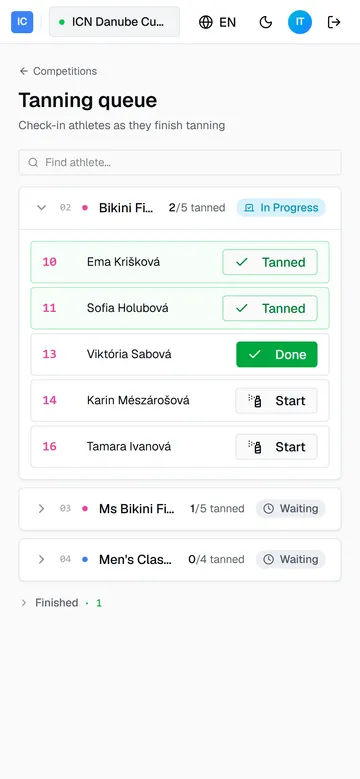
The queue follows the running order, so the athletes closest to the stage are at the top. The active category is open; the rest are collapsed, Finished ones at the bottom. Find athlete jumps to anyone by name or number.
Each athlete carries one button that steps through the process in order. Tap it to advance:
- Start the athlete has not been tanned yet. Tap when they sit down.
- Done they are being sprayed. Tap when the coat is on.
- Tanned they are finished. Tapping again cycles back to the start, so a mistake is one tap to undo.
The header counts the finished ones, “2/5 tanned”, per category. Because tanning is tracked per athlete, someone entered in two categories shows the same state in both.
The step you see this athlete take, start to finish, is the whole job:
If something goes wrong
Section titled “If something goes wrong”- You advanced the wrong athlete. Keep tapping their button; Tanned cycles back to Start, so three taps return it to the beginning.
- An athlete is not in the queue. The queue follows registration and check-in. Someone not checked in yet will not appear; the registration desk handles that.
- The queue is empty. The competition is not in progress yet. The list fills on its own once the stage starts.
Guide version 1.0.18(sha-adb4952)