After voting
Category results
Section titled “Category results”Once a category is finished, it moves to the bottom of your dashboard’s schedule and links to its results:
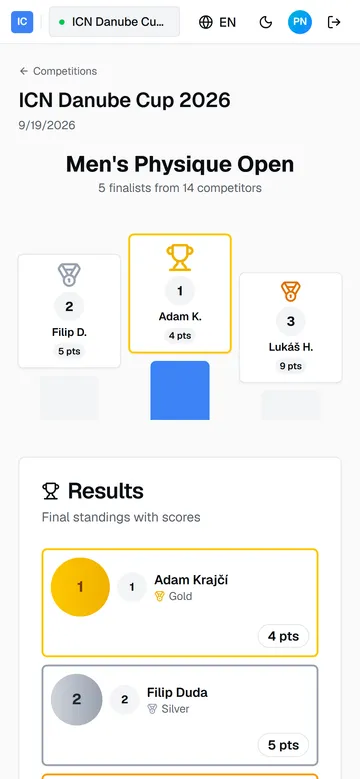
You see the final placements the same moment the Moderator announces them on stage.
If the category was closed before every judge ranked it, the results say so, for example scored by 4 of 5 judges. That happens when a judge cannot submit at all and the Commissar closes the category on the rankings that did arrive. The placements are final.
The next category
Section titled “The next category”Head back to the dashboard. When the Commissar starts the next category in the running order, it appears as On stage now and voting opens again. The cycle for each category:
- Category goes on stage. Tap Start scoring.
- Round 1: pick 5, submit, wait for the panel.
- Round 2: rank 1 to 5, submit.
- Check the results, wait for the next category.
If something goes wrong
Section titled “If something goes wrong”- Start scoring is greyed out. You have already voted in the current round. Wait; the button comes back when the next round or category opens.
- The round will not advance. A round closes only when every judge has submitted. Check the judges counter on the waiting screen; the missing vote is usually a judge who stepped away.
- You submitted the wrong ranking. A submitted vote is final in the app. Tell the Head Judge or the organizer immediately, before the category is announced.
- Your phone lost connection or the browser closed. Sign in again. Your submitted votes are already saved, and the dashboard always shows the current state of the show.
- Anything else. The organizer runs the competition in the same system and can see what you see. Ask them before the show moves on.
Guide version 1.0.18(sha-adb4952)